10. 金属
10.1 金属抽象类
如果我们希望不同的对象拥有不同的材质,那么就需要做一个设计决策。我们可以设计一种通用的材质类型,里面带有大量参数;这样每一种具体材质都可以直接忽略那些不会影响它的参数。这种做法并不差。或者,我们也可以设计一个抽象的材质类,用它来封装不同材质各自独特的行为。我个人更喜欢后一种做法。对于我们的程序来说,材质需要做两件事:
- 产生一条散射光线,或者说明它吸收了入射光线。
- 如果发生了散射,说明这条光线应该被衰减多少。
这就引出了下面这个抽象类:
#ifndef MATERIAL_H
#define MATERIAL_H

#include "hittable.h"

class material {
  public:
    virtual ~material() = default;

    virtual bool scatter(
        const ray& r_in, const hit_record& rec, color& attenuation, ray& scattered
    ) const {
        return false;
    }
};

#endif
10.2 用来描述射线-物体接面的数据结构
hit_record 的作用是避免传入一大堆参数,这样我们就可以把任何想要的信息都塞到里面。你也可以不用这种封装类型,而是直接使用函数参数;这只是个人偏好的问题。hittable 和 material 在代码中都需要能够引用对方的类型,所以这里会出现某种循环引用。在 C++ 中,我们加入这一行:class material;来告诉编译器:material 是一个稍后会定义的类。由于我们这里只是指定一个指向该类的指针,编译器不需要知道这个类的具体细节,因此就可以解决循环引用的问题。
class material;

class hit_record {
  public:
    point3 p;
    vec3 normal;
    shared_ptr<material> mat;
    double t;
    bool front_face;

    void set_face_normal(const ray& r, const vec3& outward_normal) {
        front_face = dot(r.direction(), outward_normal) < 0;
        normal = front_face ? outward_normal : -outward_normal;
    }
};
hit_record 只是把一堆参数塞进一个类里的方式,这样我们就可以把它们作为一组一起传递。当一条射线击中某个表面时,比如某个具体的球体,hit_record 里的材质指针会被设置为指向这个球体在 main() 中创建时被赋予的那个材质指针。当 ray_color() 函数拿到这个 hit_record 之后,就可以调用该材质指针的成员函数,来判断是否有光线被散射;如果有,也可以知道被散射出去的是哪条光线。
为了做到这一点,hit_record 需要知道分配给这个球体的材质是什么。
class sphere : public hittable {
  public:
    sphere(const point3& center, double radius) : center(center), radius(std::fmax(0,radius)) {
        // TODO: 初始化材质指针 `mat`
    }

    bool hit(const ray& r, interval ray_t, hit_record& rec) const override {
        ...

        rec.t = root;
        rec.p = r.at(rec.t);
        vec3 outward_normal = (rec.p - center) / radius;
        rec.set_face_normal(r, outward_normal);
        rec.mat = mat;

        return true;
    }

  private:
    point3 center;
    double radius;
    shared_ptr<material> mat;
};
10.3 建模光线散射与反射
在这里以及本书的后续内容中,我们会使用术语 albedo(拉丁语中意为“白度”)。在某些学科中,albedo 是一个精确的技术术语;但无论在哪种情况下,它都用来定义某种形式的比例反射率 (fractional reflectance)。Albedo 会随着材质颜色而变化,并且正如我们之后在玻璃材质中会实现的那样,它也可能随着入射观察方向而变化,也就是入射光线的方向。
Lambertian(漫反射)反射率可以有两种处理方式:一种是总是发生散射,并根据它的反射率 对光线进行衰减;另一种是有时发生散射,也就是以概率 散射且不进行衰减,而没有被散射的光线就直接被材质吸收。它也可以是这两种策略的混合。我们会选择总是进行散射,因此实现 Lambertian 材质就变成了一个简单的任务:
class material {
    ...
};

class lambertian : public material {
  public:
    lambertian(const color& albedo) : albedo(albedo) {}

    bool scatter(const ray& r_in, const hit_record& rec, color& attenuation, ray& scattered)
    const override {
        auto scatter_direction = rec.normal + random_unit_vector();
        scattered = ray(rec.p, scatter_direction);
        attenuation = albedo;
        return true;
    }

  private:
    color albedo;
};
注意第三种选择:我们可以用某个固定概率 来进行散射,并让衰减值为:。具体怎么选由你决定。
如果你仔细阅读上面的代码,会注意到这里有一个小小的潜在麻烦:如果我们生成的随机单位向量刚好与法线方向完全相反,那么这两个向量相加就会得到零向量,进而导致散射方向向量为零。这之后会引发糟糕的情况,比如无穷大和 NaN,所以我们需要在把这个结果继续传递下去之前,先拦截这种情况。
为此,我们会创建一个新的向量方法:vec3::near_zero()。如果这个向量在所有维度上都非常接近零,它就会返回 true。
接下来的修改会使用 C++ 标准库函数 std::fabs,它会返回输入值的绝对值。
class vec3 {
    ...

    double length_squared() const {
        return e[0]*e[0] + e[1]*e[1] + e[2]*e[2];
    }

    bool near_zero() const {
        // 若向量在所有维度都接近零,返回 true
        auto s = 1e-8;
        return (std::fabs(e[0]) < s) && (std::fabs(e[1]) < s) && (std::fabs(e[2]) < s);
    }

    ...
};
class lambertian : public material {
  public:
    lambertian(const color& albedo) : albedo(albedo) {}

    bool scatter(const ray& r_in, const hit_record& rec, color& attenuation, ray& scattered)
    const override {
        auto scatter_direction = rec.normal + random_unit_vector();

        // 收集退化的散射方向
        if (scatter_direction.near_zero())
            scatter_direction = rec.normal;

        scattered = ray(rec.p, scatter_direction);
        attenuation = albedo;
        return true;
    }

  private:
    color albedo;
};
10.4 镜面光反射
对于抛光金属来说,光线不会被随机散射。关键问题是:一条光线会如何从金属镜面上反射出去?这里,向量数学就是我们的好朋友:
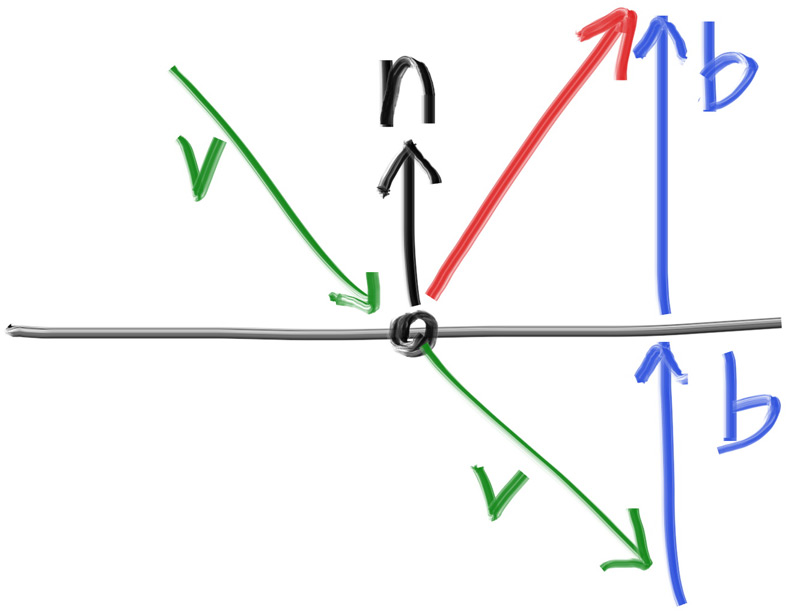
红色的反射光线方向其实就是 。在我们的设计中, 是一个单位向量,也就是长度为 1,但 不一定是单位向量。为了得到向量 ,我们把法线向量按 投影到 上的长度进行缩放,而这个长度由点积 给出。如果 不是单位向量,那么我们还需要把这个点积除以 的长度。最后,因为 指向表面内部,而我们希望 指向表面外部,所以需要对这个投影长度取负。
把所有内容合在一起,就得到下面这个反射向量的计算方式:
...

inline vec3 random_on_hemisphere(const vec3& normal) {
    ...
}

inline vec3 reflect(const vec3& v, const vec3& n) {
    return v - 2*dot(v,n)*n;
}
金属材质使用公式反射光线:
...

class lambertian : public material {
    ...
};

class metal : public material {
  public:
    metal(const color& albedo) : albedo(albedo) {}

    bool scatter(const ray& r_in, const hit_record& rec, color& attenuation, ray& scattered)
    const override {
        vec3 reflected = reflect(r_in.direction(), rec.normal);
        scattered = ray(rec.p, reflected);
        attenuation = albedo;
        return true;
    }

  private:
    color albedo;
};
我们需要修改 ray_color() 函数,以适配前面所有这些改动:
#include "hittable.h"
#include "material.h"
...

class camera {
  ...
  private:
    ...
    color ray_color(const ray& r, int depth, const hittable& world) const {
        // 若超出射线弹射上限,不再收集更多光线
        if (depth <= 0)
            return color(0,0,0);

        hit_record rec;

        if (world.hit(r, interval(0.001, infinity), rec)) {
            ray scattered;
            color attenuation;
            if (rec.mat->scatter(r, rec, attenuation, scattered))
                return attenuation * ray_color(scattered, depth-1, world);
            return color(0,0,0);
        }

        vec3 unit_direction = unit_vector(r.direction());
        auto a = 0.5*(unit_direction.y() + 1.0);
        return (1.0-a)*color(1.0, 1.0, 1.0) + a*color(0.5, 0.7, 1.0);
    }
};
现在我们要更新 sphere 构造函数来初始化材质指针 mat:
class sphere : public hittable {
  public:
    sphere(const point3& center, double radius, shared_ptr<material> mat)
      : center(center), radius(std::fmax(0,radius)), mat(mat) {}

    ...
};
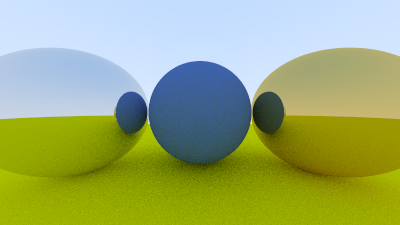
10.5 一个有金属球的场景
现在让我们在场景里加入一些金属球:
#include "rtweekend.h"

#include "camera.h"
#include "hittable.h"
#include "hittable_list.h"
#include "material.h"
#include "sphere.h"

int main() {
    hittable_list world;

    auto material_ground = make_shared<lambertian>(color(0.8, 0.8, 0.0));
    auto material_center = make_shared<lambertian>(color(0.1, 0.2, 0.5));
    auto material_left   = make_shared<metal>(color(0.8, 0.8, 0.8));
    auto material_right  = make_shared<metal>(color(0.8, 0.6, 0.2));

    world.add(make_shared<sphere>(point3( 0.0, -100.5, -1.0), 100.0, material_ground));
    world.add(make_shared<sphere>(point3( 0.0,    0.0, -1.2),   0.5, material_center));
    world.add(make_shared<sphere>(point3(-1.0,    0.0, -1.0),   0.5, material_left));
    world.add(make_shared<sphere>(point3( 1.0,    0.0, -1.0),   0.5, material_right));

    camera cam;

    cam.aspect_ratio      = 16.0 / 9.0;
    cam.image_width       = 400;
    cam.samples_per_pixel = 100;
    cam.max_depth         = 50;

    cam.render(world);
}
其结果:
10.6 模糊反射
我们也可以通过一个小球来随机化反射方向,并为光线选择一个新的终点。我们会从一个球的表面上随机选取一点;这个球以原本的终点为中心,并按照模糊系数 (fuzz factor) 进行缩放。
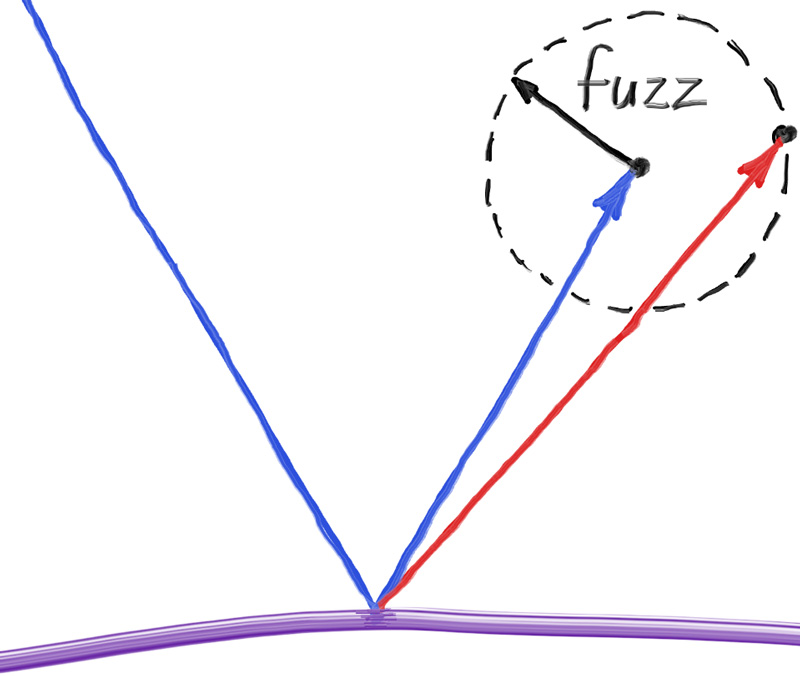
模糊球越大,反射就会越模糊。这意味着我们可以加入一个模糊度参数,它本质上就是这个球的半径;因此,当模糊度为零时,就不会产生任何扰动。不过这里有个问题:对于较大的模糊球,或者几乎贴着表面射来的掠射光线,我们可能会把光线散射到表面下方。遇到这种情况时,可以直接让表面吸收这些光线。
另外还要注意:为了让模糊球的效果有意义,它需要相对于反射向量保持一致的缩放比例,而反射向量的长度可能会任意变化。为了解决这一点,我们需要先将反射光线归一化。
class metal : public material {
  public:
    metal(const color& albedo, double fuzz) : albedo(albedo), fuzz(fuzz < 1 ? fuzz : 1) {}

    bool scatter(const ray& r_in, const hit_record& rec, color& attenuation, ray& scattered)
    const override {
        vec3 reflected = reflect(r_in.direction(), rec.normal);
        reflected = unit_vector(reflected) + (fuzz * random_unit_vector());
        scattered = ray(rec.p, reflected);
        attenuation = albedo;
        return (dot(scattered.direction(), rec.normal) > 0);
    }

  private:
    color albedo;
    double fuzz;
};
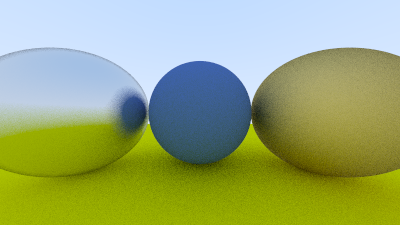
我们可以尝试添加模糊度 0.3 与 1.0 到金属:
int main() {
    ...
    auto material_ground = make_shared<lambertian>(color(0.8, 0.8, 0.0));
    auto material_center = make_shared<lambertian>(color(0.1, 0.2, 0.5));
    auto material_left   = make_shared<metal>(color(0.8, 0.8, 0.8), 0.3);
    auto material_right  = make_shared<metal>(color(0.8, 0.6, 0.2), 1.0);
    ...
}